Getting more Amazon reviews safely starts with an accurate customer experience, not a more aggressive request. Match the listing to the delivered product, use Amazon's approved review paths consistently, and keep refunds, support, and other benefits independent of review activity.
The safest way to get Amazon reviews is to deliver a product that matches its listing, use Amazon's neutral Request a Review feature for eligible orders, enroll suitable products in Amazon Vine, and resolve customer concerns without asking anyone to write, change, or remove a review. No compliant workflow can guarantee a review, a favorable rating, or a specific review count.
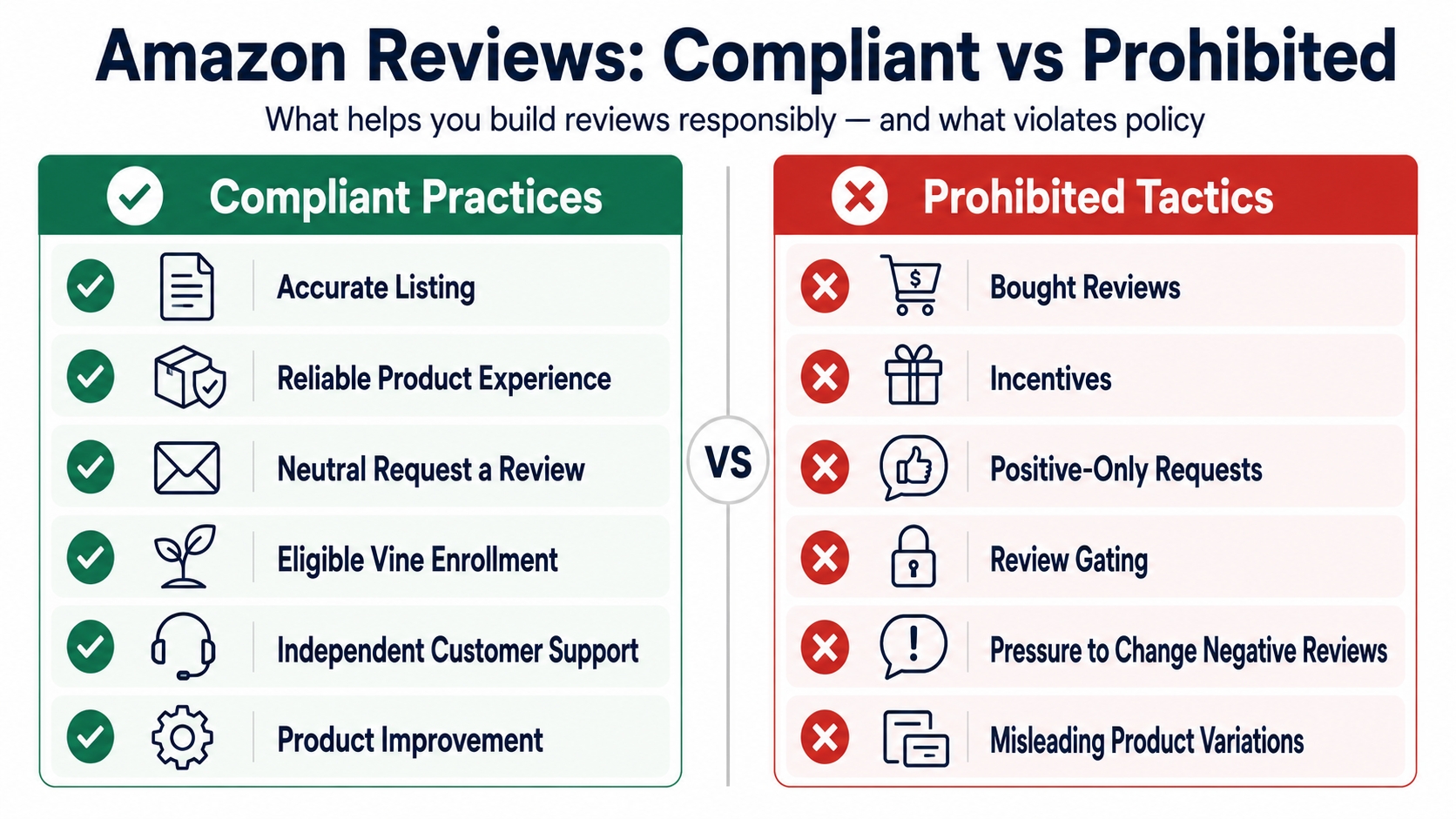
Key takeaways
- Keep every request neutral. A customer must remain free to leave a positive, neutral, or negative opinion.
- Apply the same eligibility rule consistently. Do not request reviews only from buyers you expect to be satisfied.
- Separate service remedies from reviews. A refund, replacement, discount, warranty benefit, or support outcome must never depend on review activity.
- Treat automation as execution, not permission. Sellers remain responsible for the settings, targeting, messages, and third parties acting on their behalf.
- Improve the experience behind the rating. Repeated review themes should lead to product, packaging, instruction, listing, or fulfillment changes.
Sellers searching for how to get reviews on Amazon often focus on the final request. In practice, the request is only one part of the system. Review growth is more defensible when the product meets expectations, the listing prevents avoidable misunderstandings, every eligible buyer is treated consistently, and customer-service decisions remain independent from public feedback.
This article focuses on the acquisition workflow. For the broader operating system covering review monitoring, Amazon Vine, suspected policy violations, and product-improvement loops, see our Amazon Reviews Guide for Sellers: Compliant Growth in 2026.
The recommendations below distinguish three types of information: Amazon's public seller guidance, US consumer-protection context from the FTC, and SellerSprite editorial operating practices. Marketplace, account, role, product, and interface availability can differ, so verify policy-sensitive steps inside Seller Central before updating an SOP.
How to get more Amazon reviews safely: choose the right path
Different tools serve different jobs. Request a Review is a neutral post-order request. Vine is an early-feedback program for eligible products. The Customer Reviews tool helps eligible brands monitor recent feedback and use Amazon-provided support options. Product inserts should reduce setup friction, not steer sentiment. Automation can standardize execution, but it does not create a new policy exception.
| Method | Best use | What the seller controls | Important limit |
|---|---|---|---|
| Accurate product experience | Preventing expectation gaps before an order | Product quality, listing accuracy, packaging, instructions, and support readiness | A better experience can make authentic feedback more useful, but it cannot guarantee reviews or positive ratings |
| Request a Review | A standardized request for eligible completed orders | Whether to use Amazon's feature under a consistent eligibility rule | The seller does not control the message wording, customer response, rating, or review content |
| Amazon Vine | Eligible products that need early independent feedback | Which eligible product and unit quantity to enroll | Vine Voices choose products and publish honest opinions; enrollment does not guarantee a favorable review |
| Customer Reviews tool | Monitoring recent reviews and resolving eligible customer concerns | Internal triage, product fixes, and the Amazon-provided contact option selected | Support must not become a request to change, remove, or improve a review |
| Product insert | Setup, safety, care, warranty, and support information | Instructions and a consistent support path for all customers | Do not ask for positive sentiment or divert dissatisfied customers away from Amazon reviews |
| Review automation | Applying a documented workflow at scale | Eligibility logic, permissions, vendor settings, logs, and oversight | Software does not transfer responsibility or make prohibited targeting and messaging compliant |
Tool availability and permissions vary by marketplace, account, brand role, product, and current Seller Central configuration.
The core compliance rule: separate the request from the remedy
The clearest way to evaluate a review workflow is to divide it into three independent lanes. The customer experience creates the underlying opinion. The review request gives the customer a neutral opportunity to share that opinion. Customer support resolves a legitimate problem regardless of whether the customer reviews the product or what the customer says.
Customer experience
Deliver what the listing promises. Make setup, compatibility, packaging, instructions, and support easy to understand.
Neutral review request
Use an approved path consistently for eligible orders without asking for a particular rating or selecting only likely advocates.
Independent support
Provide appropriate troubleshooting, refunds, replacements, or other remedies without mentioning review creation, modification, or removal.
Would the customer receive the same support, refund consideration, replacement, discount, or warranty treatment if they never wrote a review or left a negative one? If the answer is no, stop and revise the workflow.
Step 1: Remove avoidable review friction before asking
The most sustainable way to get more Amazon reviews is to reduce the number of customers who feel misled, confused, or unsupported. Audit customer-ready production units, not only samples or renders. Compare the final product, package contents, instructions, and variation labels with every material claim on the detail page.
A listing can be technically accurate and still create the wrong expectation. A dimension may be present but visually easy to miss. Compatibility may be described without explaining an excluded model. An accessory may appear in a lifestyle image even though it is not included. These gaps often surface later as reviews, returns, and support contacts.
| Audit area | Questions to verify | Evidence to keep |
|---|---|---|
| Core claims | Do dimensions, materials, quantities, performance limits, and compatibility match the shipped product? | Final listing copy, dated product specifications, and approved production sample |
| Included items | Can a customer tell exactly what is and is not included before ordering? | Package contents checklist and annotated listing images |
| Setup and use | Can a first-time user assemble, activate, clean, store, or troubleshoot the product? | Usability test notes, instructions, QR destination, and support article |
| Variations | Are size, color, model, quantity, and generation labels distinct and correctly mapped? | Parent-child map, SKU-to-ASIN record, and variation-specific images |
| Packaging | Does packaging protect the item and make missing parts, damage, or opening steps easy to identify? | Transit test results, package photos, and batch or supplier records |
Pair the audit with return reasons, customer messages, warranty contacts, and recent review themes. One complaint can reveal a real issue, but repeated evidence across multiple sources gives the team a stronger basis for changing the product or listing.
Step 2: Use Amazon's Request a Review feature consistently
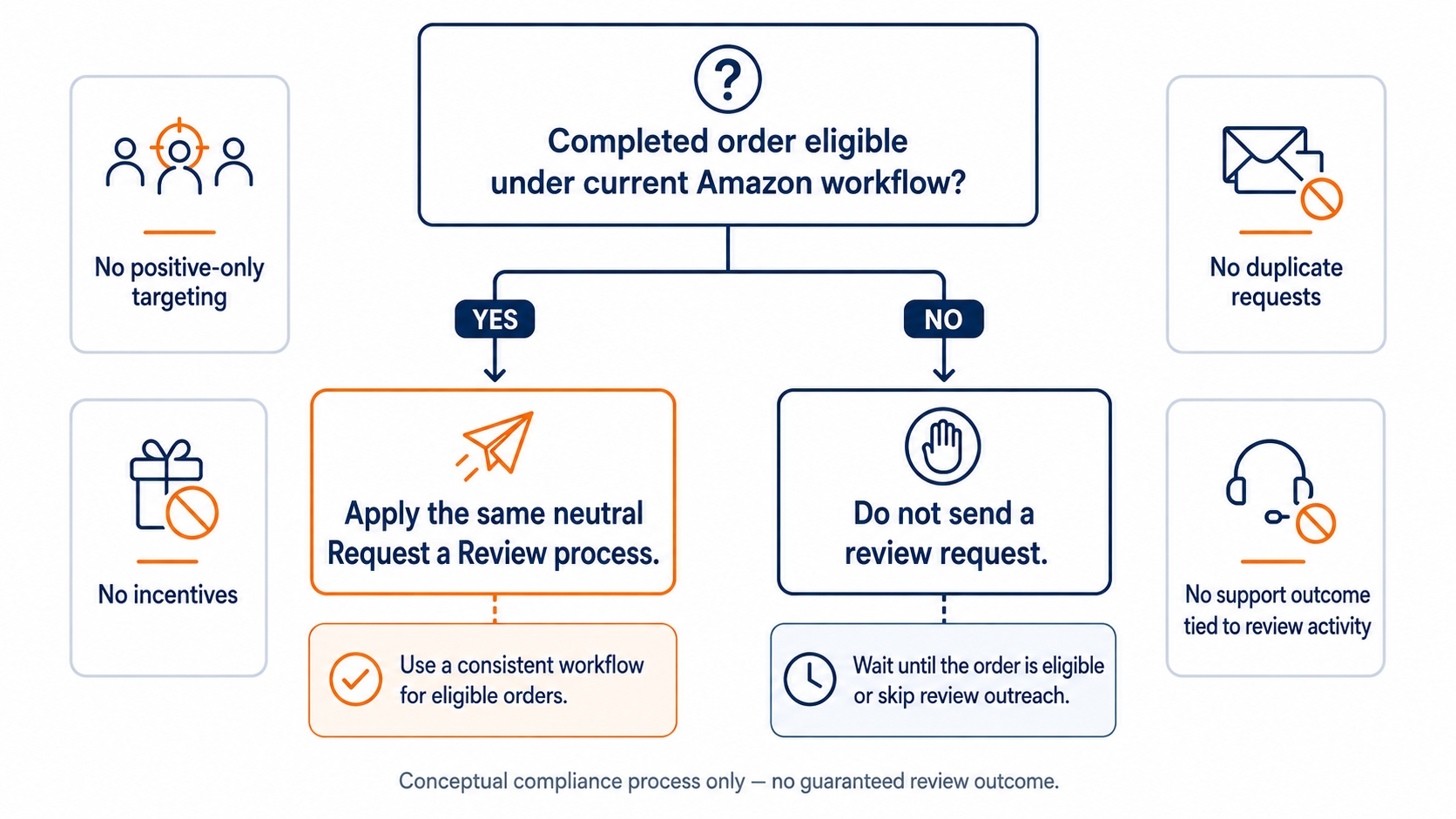
Amazon's public Customer Reviews page identifies Request a Review as a seller option for sending an automated review request from the Order details page. The operational advantage is standardization: the seller uses Amazon's approved workflow rather than writing a custom message that could introduce sentiment pressure, incentives, or nonessential promotional content.
Consistency is as important as wording. Build the SOP around objective order eligibility rather than predicted satisfaction. Do not request reviews only after a positive support interaction, exclude customers who contacted support, or send the request only to segments expected to leave high ratings. Those patterns can create a selectively positive review pool.
A defensible Request a Review SOP
- Define eligibility. Record which completed orders are eligible under the current Amazon workflow and which exclusions are operationally necessary.
- Apply the rule consistently. Do not use complaint history, predicted satisfaction, or a positive customer-service outcome as a filter.
- Avoid overlapping requests. Review existing automations, agency messages, and manual processes so the customer is not exposed to duplicate or conflicting review solicitations.
- Keep support separate. Order or product troubleshooting should focus on resolution, not on whether the customer has reviewed the item.
- Record the policy check. Save the Amazon source, the review date, the SOP owner, and the next review date.
Important limit: A neutral request gives the customer an opportunity to respond. It does not guarantee that the customer will leave a review, and it does not give the seller control over the rating or wording.
Step 3: Use Amazon Vine for eligible, launch-ready products
Amazon Vine is a separate Amazon review program that connects enrolled products with Vine Voices, who are reviewers invited by Amazon based on the quality and helpfulness of their past contributions. Eligible sellers provide units free of charge, and Vine Voices share independent opinions after trying the product.
Vine is best suited to a product that is ready for scrutiny. Inspect final production units, listing claims, packaging, instructions, compatibility, and variation structure before enrollment. If the team already knows that the product has a quality or expectation problem, address the issue first rather than using Vine to accelerate feedback on an avoidable defect.
Verify current account, product, FBA, review-count, marketplace, unit, and fee requirements on the official Amazon Vine page and inside Seller Central before enrolling. Vine enrollment does not guarantee that every unit will be claimed, that every claimed unit will produce a review, or that any review will be favorable.
Good fit
The product is eligible, inventory and listing content are ready, the team can absorb unit and program costs, and honest early feedback can improve launch decisions.
Poor fit
The product still has unresolved quality, instruction, packaging, compliance, compatibility, or listing problems that are likely to create preventable negative experiences.
Step 4: Resolve customer concerns without review pressure
Customer support and review acquisition are different workflows. Amazon's Customer Reviews tool allows eligible Brand Representatives to monitor recent reviews. For ratings below three stars, Amazon states that eligible users may use the provided contact option to offer a full courtesy refund or request additional information to clarify and resolve a product issue.
The purpose of that contact is support. Do not ask the customer to remove, revise, improve, or update the review. Do not imply that a refund, replacement, troubleshooting step, or other remedy depends on the customer taking any review action. The same principle applies outside the Customer Reviews tool: solve a legitimate service problem because the problem deserves a remedy.
| Support stage | Appropriate focus | Boundary to keep |
|---|---|---|
| Diagnose | Clarify the product, order, compatibility, setup, damage, or missing-part issue | Do not question the customer's right to leave a critical opinion |
| Remedy | Use the refund, replacement, information, or support option permitted by the applicable workflow | Do not condition the remedy on creating, changing, or removing a review |
| Learn | Record the underlying theme and route it to product, listing, packaging, fulfillment, or support owners | Do not treat issue resolution as permission to request a better review |
Sellers cannot change customer reviews. If visible content appears to violate applicable Amazon community guidelines, use the reporting route Amazon provides and describe the concern factually. Disagreement with a rating is not, by itself, a policy violation.
Step 5: Make product inserts useful without review gating
A product insert can reduce review friction when it helps every customer use the product successfully. It can explain setup, safety, care, included parts, troubleshooting, warranty access, or a consistent support path. The insert should not divide customers into public-review and private-support routes based on satisfaction.
Appropriate insert content
- Setup, installation, safety, cleaning, storage, or care instructions
- A complete list of included parts and common troubleshooting steps
- A support path available to all customers under the same conditions
- Warranty registration or documentation that does not depend on review activity
High-risk insert content
- A request for a positive, five-star, or favorable review
- A gift, rebate, coupon, refund, or warranty benefit linked to a review
- Instructions telling unhappy customers to contact the seller instead of reviewing
- Different paths for satisfied and dissatisfied customers
Review the insert whenever packaging, agencies, warranty providers, QR destinations, or customer-service processes change. A compliant design can become risky later if a linked page or follow-up automation is modified.
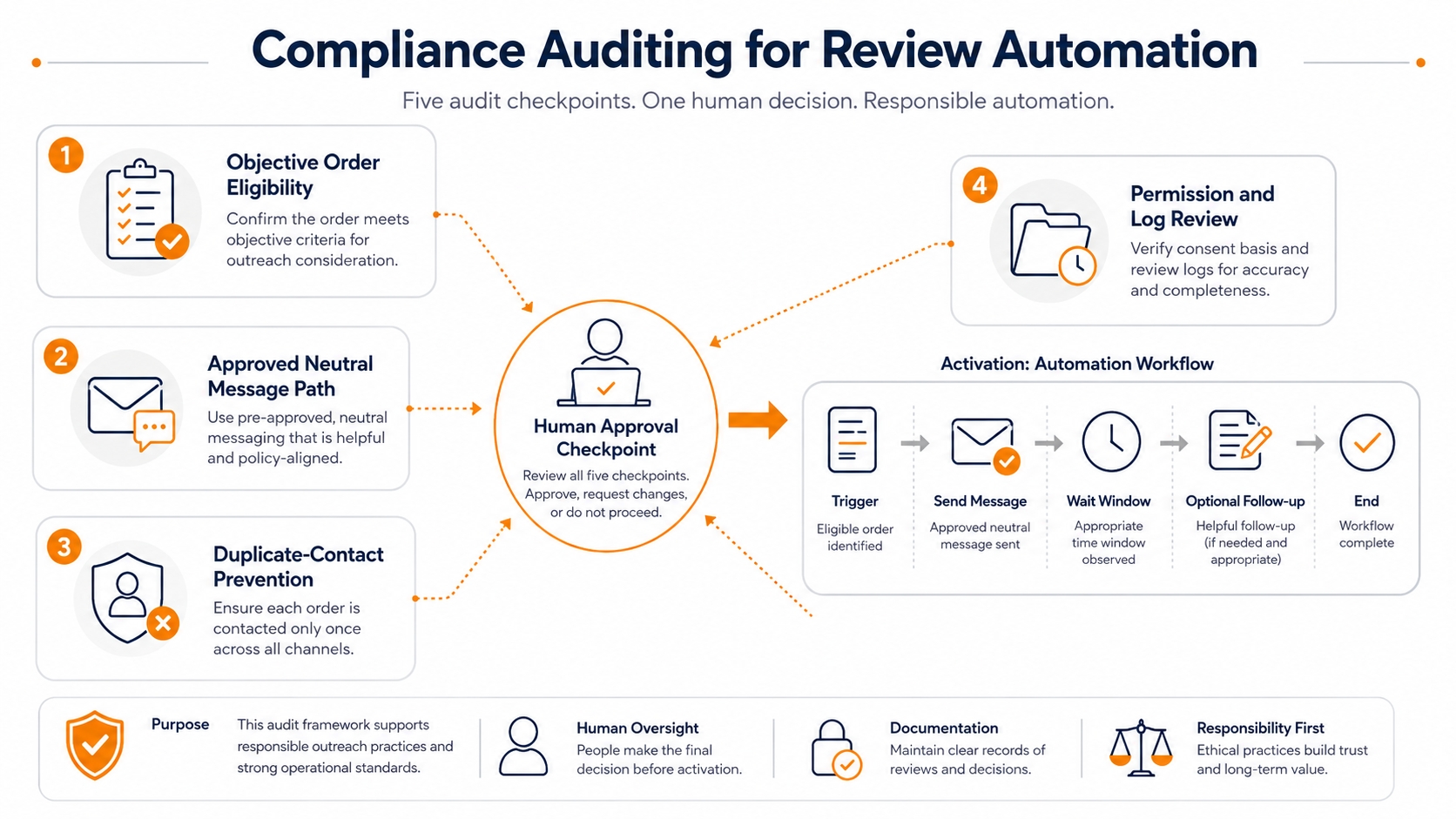
Amazon review automation: audit the whole system, not only the message
Review-request software can reduce manual work, but it cannot guarantee compliance. The seller remains responsible for the tool's permissions, targeting logic, schedule, templates, data use, and interaction with other messages. The same responsibility applies to agencies, customer-service providers, insert vendors, and review-management consultants acting on the seller's behalf.
A tool is lower risk when it applies a documented eligibility rule, uses the approved Amazon workflow, keeps an audit log, and does not claim control over ratings or review removal. Risk increases when a vendor segments customers by likely satisfaction, adds custom sentiment language, offers rebates, routes unhappy buyers away, or promises guaranteed reviews.
| Audit dimension | Questions to ask | Red flags |
|---|---|---|
| Audience logic | Which orders are included or excluded, and is the rule based on objective eligibility? | Excluding complaints, returns, low satisfaction scores, or customers predicted to leave negative feedback |
| Message path | Does the system invoke an approved Amazon workflow or send an additional custom message? | Five-star language, emotional pressure, business-impact appeals, coupons, gifts, or external review links |
| Overlap control | Can manual requests, apps, agencies, and support sequences contact the same customer? | Duplicate requests or conflicting messages about reviews and support |
| Evidence and access | Can the team review logs, settings, permissions, changes, and vendor actions? | Opaque targeting, unnecessary customer data, no change history, or no way to pause the workflow |
| Vendor claims | Does the provider describe limits and require human oversight? | Guaranteed positive reviews, guaranteed removal, undetectable methods, or claims that the seller bears no responsibility |
Turn authentic reviews into product and listing improvements
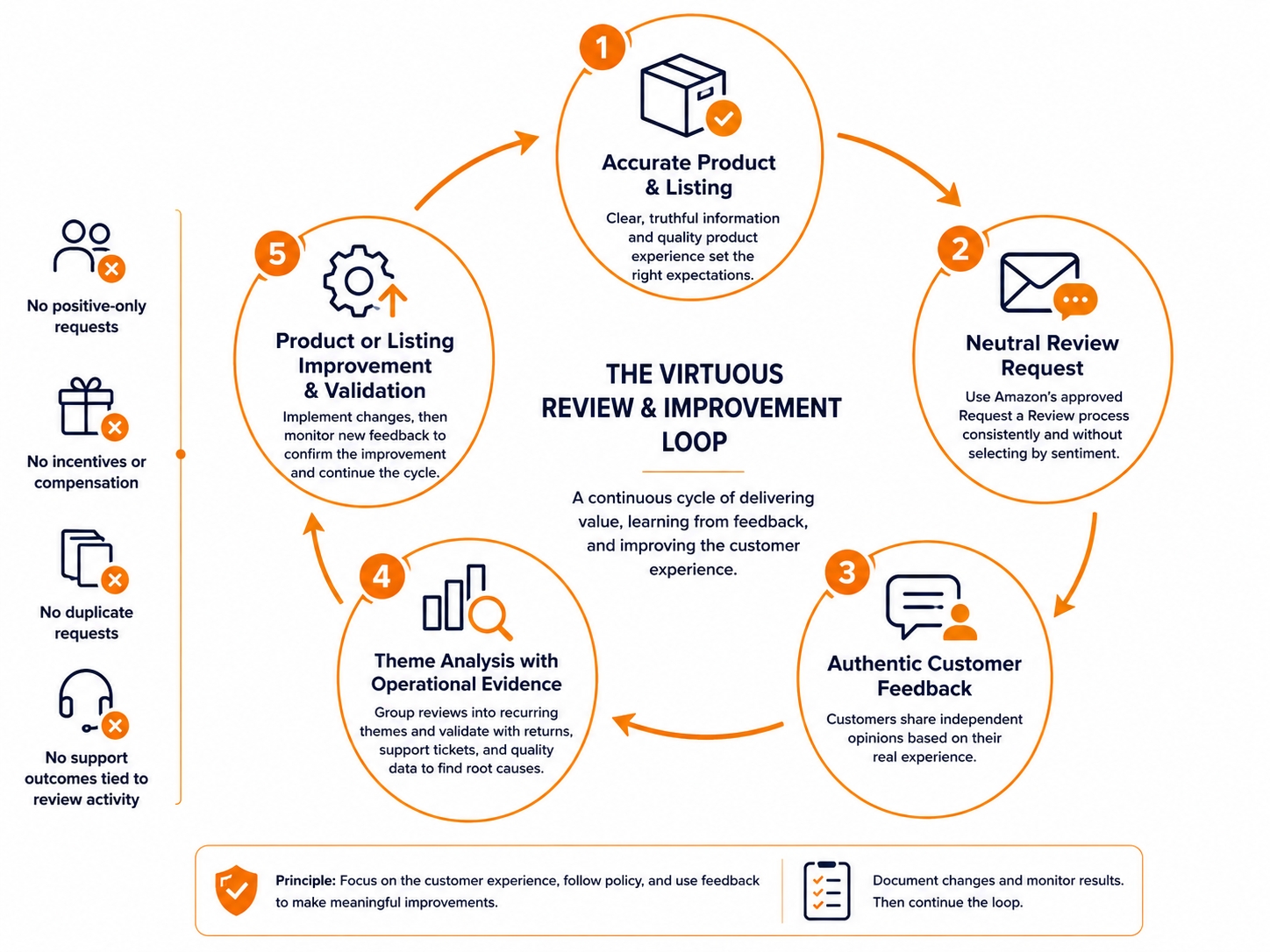
Review acquisition is only useful when the team learns from the feedback. Create a recurring review ledger that separates an isolated opinion from a repeated operational signal. At minimum, record the theme, frequency, severity, affected ASIN or variation, first-seen date, corroborating evidence, owner, action, implementation date, and validation window.
Compare review themes with returns, support contacts, replacement requests, quality checks, supplier or batch changes, listing revisions, price changes, and fulfillment events. A complaint about size may require clearer dimensions, a variation fix, or a product change. The review alone does not tell the team which explanation is correct.
| Theme | Frequency | Severity | ASIN or variation | Corroborating evidence | Owner and action | Validation date |
|---|---|---|---|---|---|---|
| Example: unclear setup | Repeated | Medium | Record affected child ASINs | Support contacts, returns, and usability test | Content owner: revise insert and listing image | After customers receive the revised version |
SellerSprite's Review Analysis workflow can help organize public review content by product, variation, rating, time period, sentiment, and recurring customer themes. Use this type of analysis to reduce manual reading and make review research reproducible, rather than to predict what Amazon will enforce or claim that one review proves a general outcome.
Measure controllable process quality
Measurement note: Treat review count, average rating, sales, ranking, and conversion changes as outcomes rather than guaranteed results. Evaluate them with documented time periods and clearly state the limits of the data.
What Amazon sellers must not do to get reviews
Amazon's review and communication guidance prohibits attempts to influence ratings, request positive reviews, or ask customers to remove negative reviews. US consumer-protection law creates an additional layer. The FTC's Consumer Reviews and Testimonials Rule addresses fake or false reviews, sentiment-conditioned incentives, undisclosed insider reviews, review suppression, and other deceptive conduct.
| Do not | Why it is risky | Safer operating approach |
|---|---|---|
| Buy reviews or use a review club | Creates manufactured social proof and can expose the account to platform and legal risk | Improve the experience and use Amazon-approved neutral review paths |
| Offer a coupon, rebate, refund, gift, or warranty benefit for an Amazon review | Links compensation or another benefit to review activity and may influence participation or sentiment | Provide legitimate remedies independently, with no review condition |
| Ask for a positive or five-star review | Attempts to influence the customer's rating or sentiment | Use a neutral Amazon-approved request without sentiment language |
| Request reviews only from likely satisfied customers | Creates a selectively positive review pool and can function as review gating | Apply a consistent eligibility rule that does not use predicted sentiment |
| Ask a customer to change, update, or remove a negative review | Interferes with independent feedback and can turn support into pressure | Resolve the issue without discussing review modification |
| Route unhappy buyers to private support while sending happy buyers to review | Filters public feedback by sentiment | Offer the same support path to all customers and keep review requests neutral |
| Review your own product or a competitor's product | Creates a material conflict and can manipulate marketplace information | Use internal research and approved reporting processes instead |
| Create misleading variation relationships to aggregate reviews | Can make feedback appear relevant to a materially different product | Use parent-child relationships only when products meet current Amazon requirements |
Platform and legal scope: The FTC Rule specifically addresses incentives conditioned on positive or negative sentiment and other deceptive practices. Amazon's marketplace requirements can be stricter. For an Amazon review workflow, follow the stricter applicable standard and do not exchange compensation or benefits for an Amazon review.
Compliant Amazon review action checklist
Build reviews by improving the experience behind them
Use a neutral Amazon-approved request process, then organize authentic customer language into product, packaging, listing, and support decisions.
Frequently asked questions
Can Amazon sellers ask customers for product reviews?
Yes. Sellers can use Amazon's approved Request a Review feature for eligible orders and other communications permitted by current Amazon policy. The request must remain neutral. It should not ask for a positive rating, target only satisfied customers, offer a benefit, or pressure the customer to change an existing review.
Can I ask for a five-star Amazon review?
No. Asking for five stars or a positive review attempts to influence sentiment. Use a neutral request that leaves the customer free to share an honest positive, neutral, or negative opinion.
Can I offer a coupon for an honest Amazon review?
Do not exchange a coupon, discount, rebate, gift, refund, free product, warranty benefit, or other compensation for an Amazon review. Amazon's marketplace requirements can be stricter than the minimum rules that apply to reviews elsewhere. Use Amazon-approved review programs and keep all customer benefits independent of review activity.
Can I ask a customer to update a negative review after a refund?
Do not ask the customer to change, update, or remove the review. Handle a legitimate refund or support remedy independently. The customer may make their own decision about the review, but the seller should not make review modification part of the resolution.
Can Amazon review automation keep my account compliant?
Automation can standardize a documented workflow, but it cannot guarantee compliance. The seller remains responsible for eligibility rules, templates, permissions, duplicate-contact controls, vendor actions, and ongoing policy checks. Reject tools that promise guaranteed positive reviews, undetectable methods, or automatic review removal.
How can I get more Amazon reviews if request volume is already consistent?
Improve the inputs behind authentic feedback. Audit listing accuracy, final production quality, packaging, instructions, variation structure, support readiness, and recurring complaint themes. A neutral request cannot compensate for a product experience that repeatedly misses customer expectations.
References
- Amazon: Customer Reviews tool
- Amazon: Amazon Vine
- Amazon: How to get authentic customer reviews
- Amazon policy reminder: Product Packaging and Inserts
- FTC: Consumer Reviews and Testimonials Rule Q&A
Scope and limitations: Unless a source states otherwise, Amazon policy and product references in this article relate to US public pages reviewed on August 19, 2026. Marketplace, category, account, role, product, interface, and program terms can differ. This article is educational and is not legal, tax, accounting, trademark, or financial advice.