Amazon Vine gives eligible sellers a structured way to place free product units with invited Vine Voices who publish independent reviews. The program can support an early product launch, but sellers still need to confirm eligibility, budget for the units and fulfillment, prepare the product for close scrutiny, and accept that neither the number nor the sentiment of reviews is guaranteed.
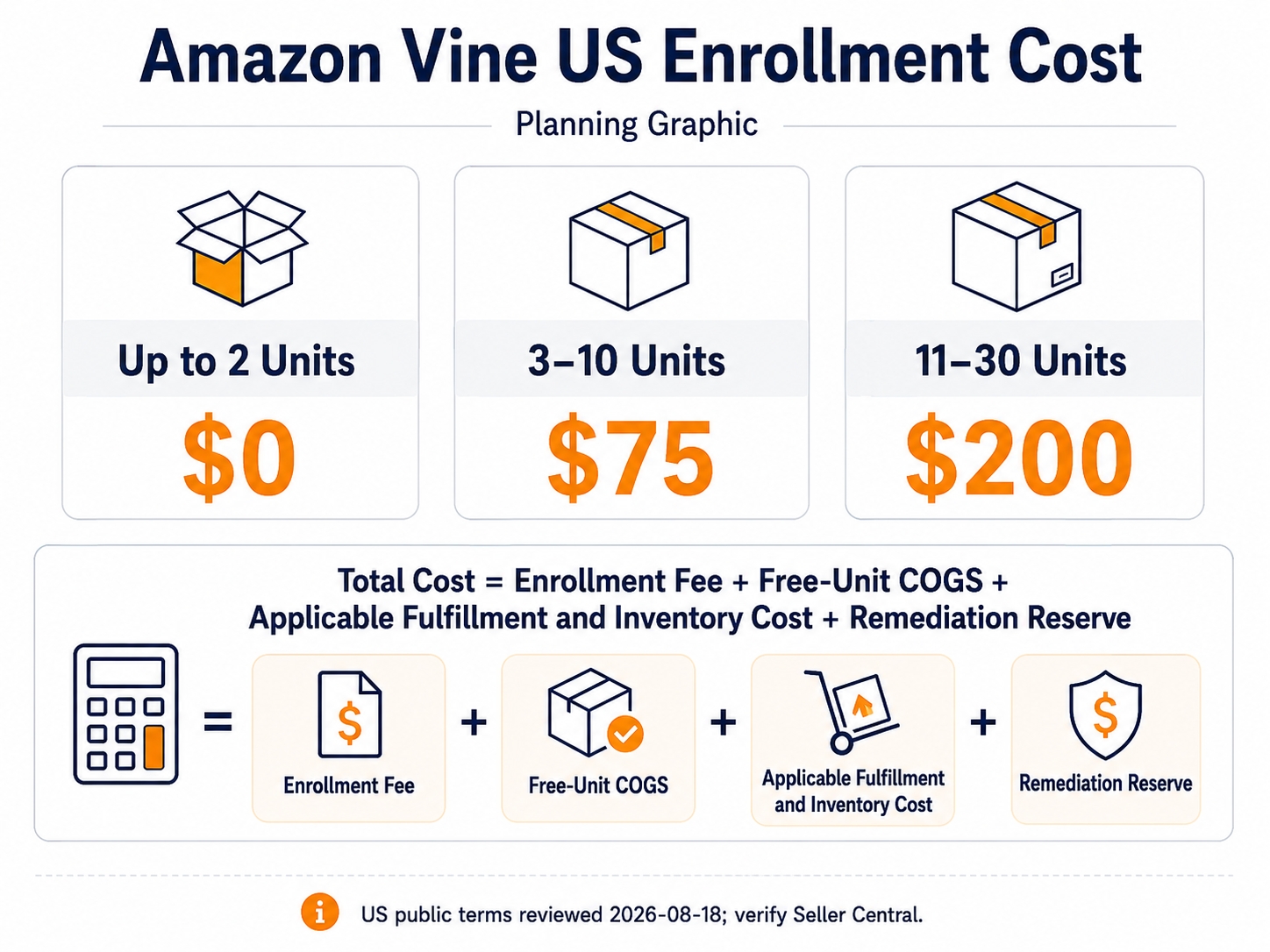
The Amazon Vine program lets eligible sellers enroll up to 30 units per parent product for invited Vine Voices to try free of charge and review honestly. Amazon's current US public page lists enrollment tiers of $0 for up to 2 units, $75 for 3–10 units, and $200 for 11–30 units. Eligibility generally requires a Professional selling account, the appropriate Brand Registry role for a branded product or an eligible generic product, an eligible FBA offer, an image and description, and fewer than 30 reviews on the product detail page. Confirm the exact eligibility, fee disclosure, and billing terms in Seller Central immediately before enrollment.
Key takeaways
- Vine produces independent feedback, not controlled social proof. Sellers choose the eligible product and unit quantity, but they do not choose the reviewers, rating, wording, or publication timing.
- Eligibility is both account-level and product-level. A seller may qualify for the program while a particular ASIN remains ineligible because of fulfillment, review count, listing content, category, or catalog conditions.
- The enrollment fee is only one part of the budget. Include free-unit cost of goods, inbound and applicable FBA costs, inventory opportunity cost, and the cost of fixing issues exposed by early feedback.
- Enroll only when the product is launch-ready. Vine Voices may reveal unresolved problems in quality, packaging, instructions, compatibility, or listing accuracy.
- Measure learning before performance. The most defensible early outcome is whether Vine reviews reveal repeatable insights that improve the product or customer experience, instead of a promised sales, ranking, or rating lift.
What is the Amazon Vine program?
Amazon Vine is an Amazon review program that connects enrolled products with Vine Voices, who are reviewers Amazon invites based on the quality and helpfulness of their past contributions. Vine Voices request products they want to try, receive those products free of charge through FBA, and publish their honest opinions. Amazon describes the program as a way to collect detailed reviews, including for products that have not yet launched.
Vine is not a paid positive-review service. The seller does not write the request, select an individual Voice, approve the review, or require a favorable rating. The seller's controllable decisions are narrower: whether to enroll an eligible product, how many units to make available, whether the product and listing are ready, and how the team acts on the feedback after reviews appear.
Vine should therefore sit inside a broader review operating system rather than function as a standalone "review generation" tactic. For the full framework covering neutral review acquisition, monitoring, product improvement, and reporting, read SellerSprite's Amazon Reviews Guide for Sellers: Compliant Growth in 2026.
Is Amazon Vine right for this product?
Eligibility answers whether Amazon allows enrollment. Readiness answers whether enrollment is strategically sensible. A product can be technically eligible and still be a poor Vine candidate if the listing is unfinished, the packaging has not been tested, the instructions are confusing, or the margin cannot absorb free units and associated costs.
Vine is strongest when early independent feedback has high learning value. A complex product, a new variation, or a product with important compatibility and setup questions may benefit from detailed usage feedback. By contrast, enrolling mainly because the team wants a particular star rating creates the wrong operating objective: the program is designed for independent opinions, not controlled outcomes.
| Readiness question | Good sign | Reason to wait | Action before enrollment |
|---|---|---|---|
| Is the shipped product final? | Production units match the version customers will receive | Supplier, materials, accessories, or packaging are still changing | Approve a production sample and record the batch/version |
| Is the listing accurate? | Images, dimensions, quantity, compatibility, and included items match the product | Claims are incomplete, ambiguous, or based on a prototype | Run a claim-by-claim listing audit |
| Can the product withstand scrutiny? | Quality, packaging, instructions, and safety checks are complete | Known defects or support issues remain unresolved | Fix the highest-confidence root cause first |
| Can the economics absorb Vine? | The team has modeled enrollment, unit, fulfillment, and opportunity costs | Margin depends on receiving a specific number of positive reviews | Build a downside-aware cost model |
Who can enroll? Amazon Vine eligibility for sellers
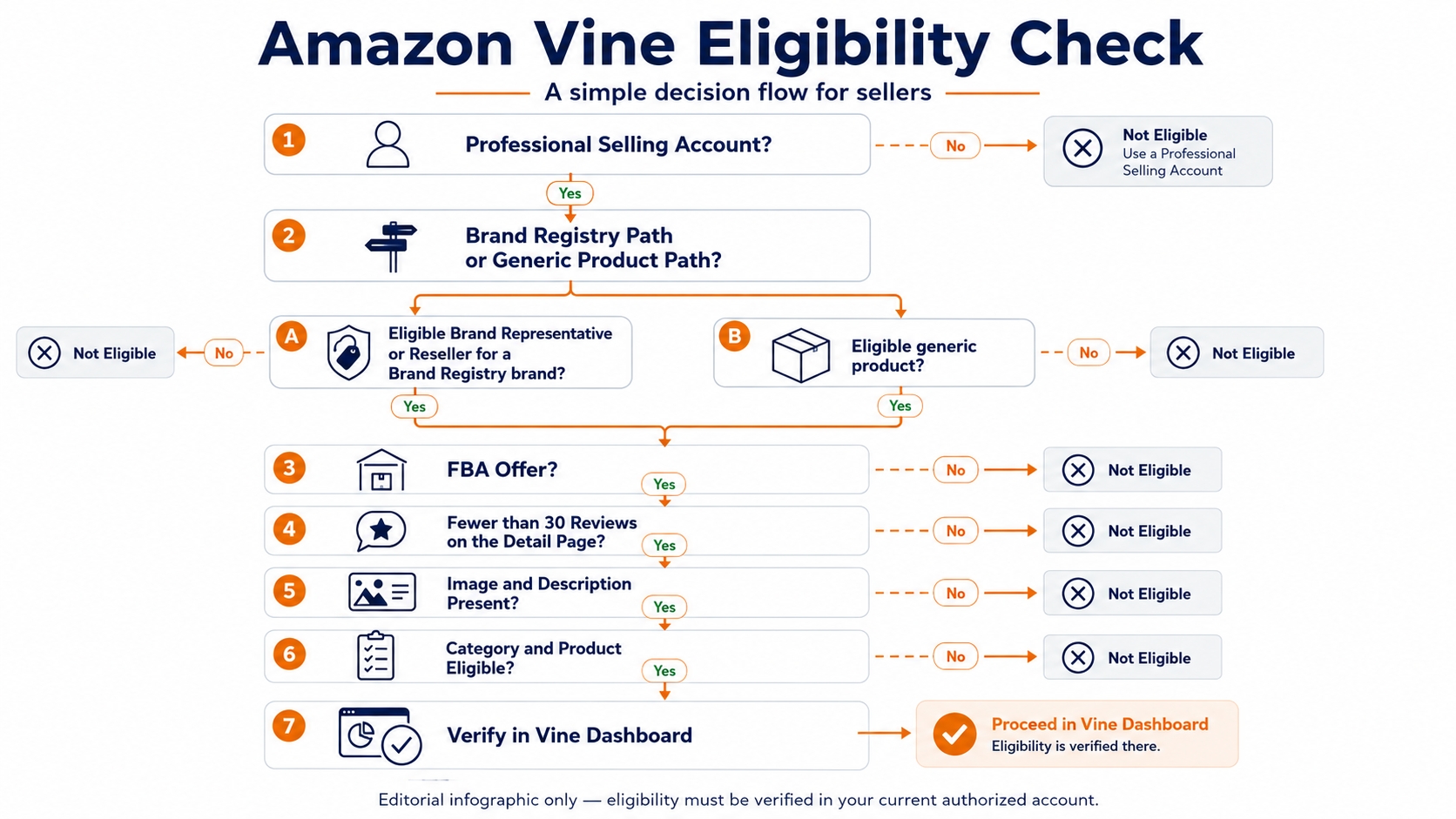
Amazon's US public Vine page (reviewed August 18, 2026) describes eligibility at three levels: the selling account, the seller's brand or generic-product status, and the individual FBA offer. The Vine dashboard in Seller Central remains the final operational check because permissions, category restrictions, catalog history, and marketplace rules can affect what a specific account can enroll.
1. Account and role requirements
The seller needs a Professional selling account. For branded products, Amazon currently says the account must have a Brand Representative or Reseller role assigned to a brand enrolled in Amazon Brand Registry. A rights owner can enroll the brand; an employee or reseller may need the Rights Owner or an Administrator to assign the appropriate role. Amazon also describes a Vine path for eligible generic products, so a branded-product workflow and a generic-product workflow should not be treated as identical.
2. Product and listing requirements
Amazon's public product requirements currently include the following:
- The listing uses FBA as the fulfillment method.
- The product detail page has fewer than 30 reviews.
- The listing includes an image and description.
- For a branded product, the brand is enrolled in Amazon Brand Registry and the user has an eligible role.
- Adult, digital, and bundled products are listed as ineligible on Amazon's public page.
- FBA inventory must reach Amazon fulfillment centers before units can be shipped to Vine Voices.
3. New versus existing products
A new product can be enrolled once it has a customer-ready FBA listing; Amazon's public workflow says enrollment can happen before inventory is received and before the listing goes live. For an existing product, the detail page must remain below the review-count threshold. This means a seller should not wait until the last moment to check eligibility: organic review growth, catalog changes, or a variation relationship can alter what the dashboard shows.
Treat public eligibility pages as planning guidance and the current Vine dashboard as the final enrollment decision. Save a dated record of the dashboard result, fee disclosure, selected unit quantity, marketplace, and parent product before submitting.
How much does Amazon Vine cost in 2026?
For the US store, Amazon's public Vine page currently lists a per-parent-product enrollment cost based on the number of units made available. It also says there is no additional enrollment cost for child products. These public terms can change, and the dashboard may show account- or marketplace-specific details, so the fee shown immediately before enrollment should be treated as the controlling disclosure.
| US units per parent product | Public enrollment cost | Practical use | Main limitation |
|---|---|---|---|
| Up to 2 units | $0 | A small operational test or a high-cost product with limited inventory | A very small sample may provide limited theme coverage |
| 3–10 units | $75 | Moderate early feedback when the product economics support more units | Still no guarantee that every unit produces a published review |
| 11–30 units | $200 | Broader feedback for a fully validated, launch-ready product | Highest unit exposure and the largest product-cost commitment |
US public terms reviewed August 18, 2026. Recheck Seller Central because marketplace, account, parent-child structure, and program terms can differ.
When does Amazon charge the enrollment fee?
Amazon's current FAQ says the seller is not charged until 30 days after enrollment and after the first Vine review is published. It also says the seller is not charged if no Vine review appears within 90 days of enrollment. Because billing language is time-sensitive, save the exact fee and billing disclosure displayed for the ASIN rather than relying only on an older SOP or article.
The true Vine budget is larger than the enrollment fee
A defensible cost model includes at least four components:
- Program fee: the current enrollment tier shown for the parent product.
- Free-unit cost: product cost, packaging, and any supplier or preparation cost for every unit made available.
- Fulfillment and inventory cost: applicable inbound, FBA, storage, and inventory opportunity costs based on the seller's actual account and supply chain.
- Learning and remediation cost: the time and budget required to analyze feedback and correct a product, packaging, instruction, compatibility, or listing problem.
Simple planning formula: Vine budget = enrollment fee + free-unit landed cost + applicable fulfillment/inventory cost + expected remediation reserve. Do not make the model depend on a guaranteed number of reviews, a minimum rating, or a promised sales lift.
How many units should a seller enroll?
The correct unit quantity is not automatically the maximum. Choose a tier by balancing learning value, product economics, inventory risk, and the maturity of the product. The unit count is an input to the program, not a promised review count. A claimed unit may take time to produce a review, and a seller should not plan as though every available unit will generate a published review by a fixed date.
- The product has high landed cost or scarce launch inventory.
- The team wants to test the operational workflow first.
- The product is simple and additional reviews may add limited learning value.
- A production or packaging change is still being validated.
- The product is fully validated and the economics support the exposure.
- Usage is complex enough that multiple perspectives may reveal different issues.
- Variation, compatibility, instruction, or use-case questions have high learning value.
- The team has a documented process for analyzing and acting on feedback.
Before selecting a tier, document the parent product, included child products, available launch inventory, landed unit cost, target learning questions, and a downside case in which reviews are delayed or critical. This keeps the decision tied to operational readiness rather than a desired rating outcome.
How to join Amazon Vine as a seller: a launch-ready workflow
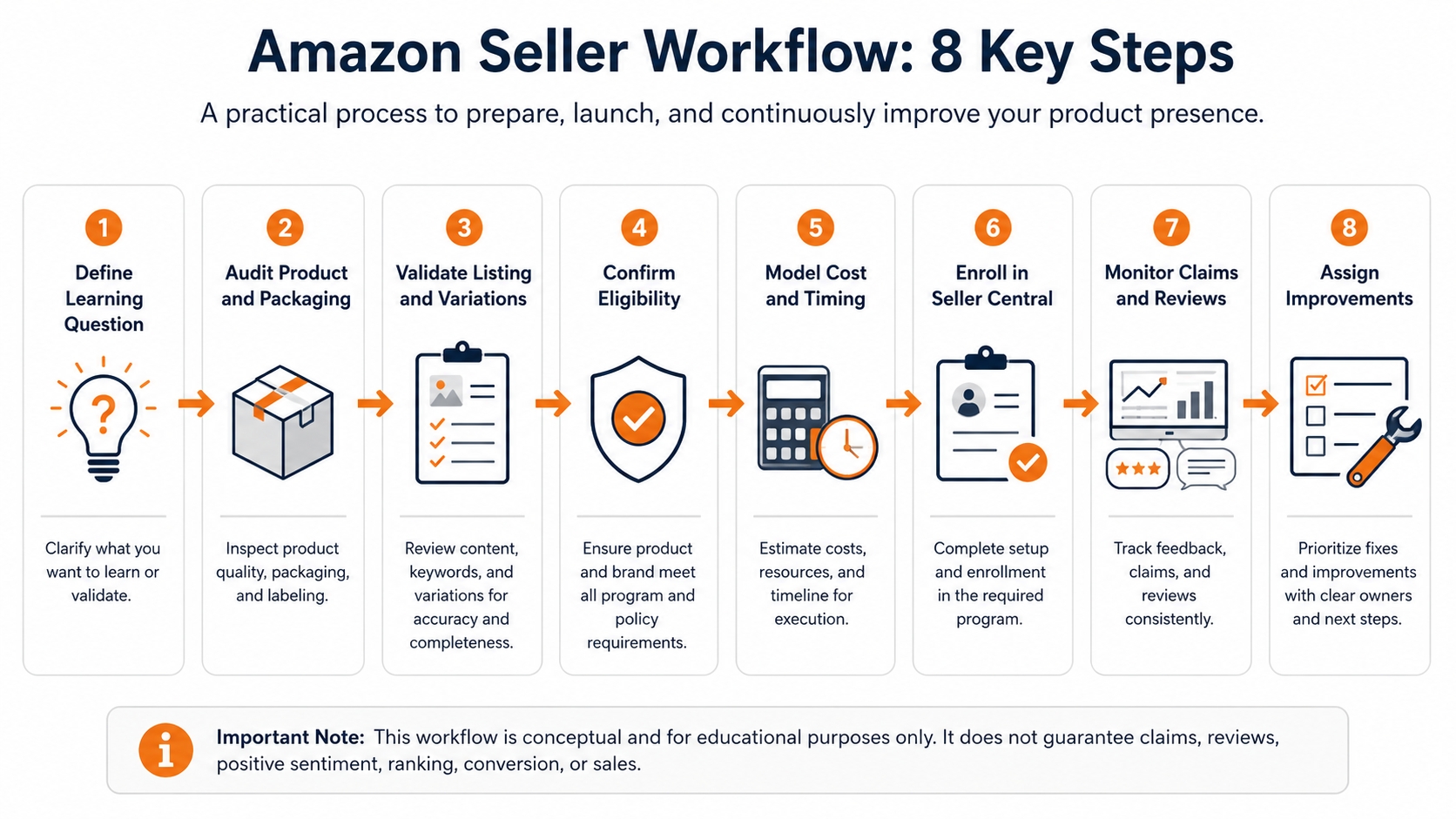
Amazon's public enrollment path is straightforward, but a responsible operational workflow begins before the seller opens the Vine dashboard. The following sequence separates product readiness, eligibility, economics, enrollment, and post-review action so the team can reproduce the decision later.
Define the launch question
State what the team needs to learn: whether setup instructions are clear, which variation creates confusion, whether packaging protects the product, or which use cases buyers describe. A learning question is more actionable than a target such as "get ten five-star reviews."
Audit the final product and packaging
Inspect customer-ready production units rather than only samples or renders. Confirm materials, dimensions, quantity, included accessories, labeling, safety information, packaging durability, instructions, and compatibility. Record the batch or version that will enter FBA.
Validate the listing and variation structure
Match every material listing claim to the shipped product. Check titles, bullets, images, dimensions, package quantity, model names, compatibility statements, and variation labels. Resolve parent-child relationships before enrollment so feedback is attached to the intended product context.
Confirm account and ASIN eligibility
Verify the Professional selling plan, Brand Registry or generic-product path, eligible role, FBA offer, review count, image and description, and product restrictions. Search for the ASIN in the Vine dashboard rather than assuming that a public eligibility checklist guarantees access.
Model cost, inventory, and timing
Calculate the enrollment tier, free-unit landed cost, applicable fulfillment and inventory cost, and launch-stock impact. Add a schedule for inbound receipt, unit claims, product use, review delay, and internal analysis. Do not make the launch dependent on all reviews appearing by one date.
Enroll through Seller Central
In Seller Central, Amazon's current public instructions direct sellers to hover over Advertising, select Vine, find an eligible FBA ASIN, choose the number of units up to the allowed maximum, review the disclosure, and select Enroll. Save the enrollment date, parent product, unit quantity, fee, and confirmation.
Monitor status without trying to influence reviews
Use the Vine dashboard to track enrollment status, claimed quantity, and reviews published. Keep the workflow operational: do not attempt to identify a Vine Voice, shape the review, or promise internal stakeholders a particular rating or review count.
Convert feedback into an owned action
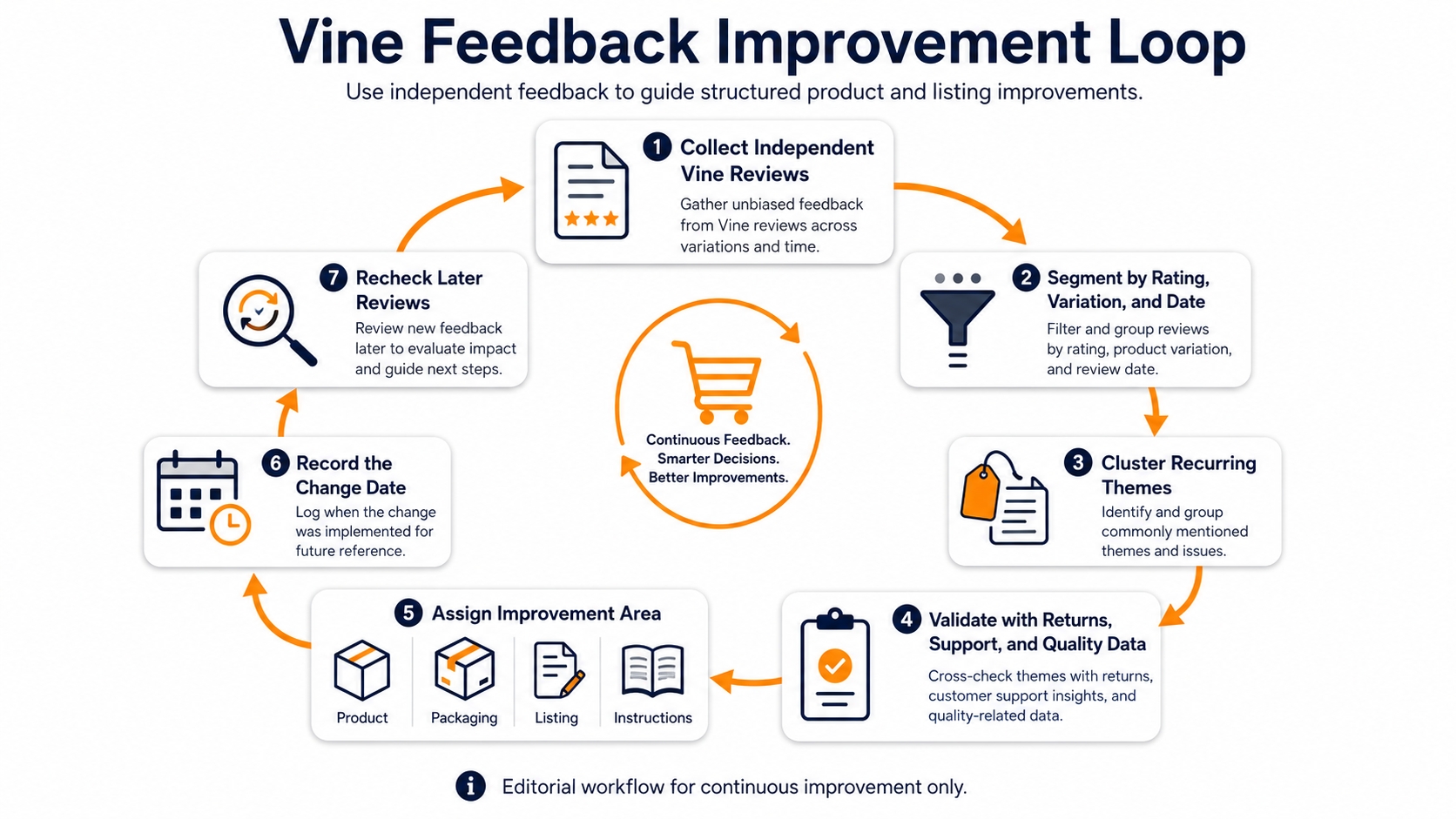
Tag recurring themes, validate them against returns, support contacts, quality findings, and product-change dates, then assign an owner. Record the exact date of any product, packaging, instruction, or listing change so later reviews can be compared with a clean post-change window.
Timing Amazon Vine before a product launch
Amazon's public page says a seller can enroll a new product as soon as the customer-ready FBA listing exists, even before inventory is received and before the listing goes live. For best results, Amazon recommends enrolling and having inventory available in the fulfillment network at least three weeks before the planned launch date so Vine Voices have time to receive, try, and review the product.
Treat three weeks as a planning recommendation, not a publication deadline. Inbound delays, unit-claim timing, delivery, reviewer availability, and the time required to use the product can all extend the schedule. A household item that can be assessed immediately and a durable product that needs repeated use should not share the same internal review expectation.
Build a launch calendar around what the team controls: listing readiness, production approval, FBA inbound timing, inventory availability, enrollment date, and the date of any product change. Keep the public launch plan functional even if Vine reviews appear later than expected or provide mixed feedback.
What happens after a product is enrolled?
After enrollment, Vine Voices can request available units they want to try. Amazon fulfills the products through FBA to help preserve reviewer anonymity. The seller can monitor the enrollment status, claimed quantity, and published reviews in the Vine dashboard, but should not convert dashboard activity into a promise that every unit will produce a review or that reviews will arrive in a specific order.
| Stage | What the seller can monitor or do | Important limit |
|---|---|---|
| No units claimed | Review the listing, inventory status, and enrollment; Amazon's current FAQ says enrollment can be canceled if no products have been claimed | Do not infer why Voices have not selected the product |
| Some units claimed | Monitor claimed quantity and remaining units; Amazon says sellers can stop enrollment to prevent additional claims | Stopping does not guarantee that reviews for already claimed units will not be published, and the product cannot be re-enrolled after stopping |
| Reviews published | Classify themes, compare variations, record product or listing actions, and use Amazon's normal reporting process for content that appears to violate applicable guidelines | The seller cannot control the rating, wording, or whether a reviewer changes an opinion |
If the team is considering cancellation or stopping enrollment, recheck the current dashboard language before acting. The operational consequences differ depending on whether any unit has been claimed, and program rules can change.
Vine review independence: what sellers can and cannot control
The value and risk of Vine come from the same feature: the reviews are independent. Amazon says Vine Voices receive the product free of charge and share honest, unbiased opinions. Sellers should prepare for positive, mixed, and critical feedback and should not treat a critical review as a program failure when it accurately reveals a customer problem.
The seller can control
- Whether an eligible product is enrolled
- The selected unit quantity and budget
- Product, packaging, instruction, and listing readiness
- Inventory availability and internal timing
- How review themes are documented and acted on
The seller cannot control
- Which Vine Voice claims the product
- Whether every available or claimed unit produces a review
- The publication date, rating, wording, images, or conclusions
- Whether Amazon removes content after a report
- A guaranteed sales, ranking, conversion, or review-count result
Do not attempt to identify a Vine Voice, offer an additional benefit, request a positive rating, challenge a reviewer privately, or ask for a review to be changed or removed. Separate legitimate product support from review activity and use Amazon-provided reporting or support routes only where the current account and policy allow them.
Turn Vine reviews into product and listing decisions
Vine reviews should be treated as early customer evidence, not only as a rating outcome. The useful question is not "Did we get a high average?" but "Which repeated observations can the team validate and improve?" A single review can reveal a real problem, but it does not establish prevalence. Group themes before counting sentiment and compare them with operational data.
| Theme | Frequency | Severity | ASIN / variation | Corroborating evidence | Owner | Action | Validation date |
|---|---|---|---|---|---|---|---|
| Example: setup step is unclear | Repeated | Medium | Record affected variation(s) | Support contacts + test users | Product content | Revise instructions and listing image | After new units reach customers |
A reproducible SellerSprite review-analysis workflow
SellerSprite's Review Analysis Guide describes workflows for examining reviews and ratings by product and variation, comparing time periods, and organizing themes such as product strengths, weaknesses, use scenarios, customer expectations, and purchase motivations. Use this type of analysis to reduce manual reading and make review research reproducible, rather than to predict what Amazon will enforce or to claim that one review proves a general outcome.
- Define one question. Examples: "Which complaint appears across multiple variations?" or "Did instruction-related criticism decline after the new insert reached customers?"
- Segment the review set. Separate ratings, variations, and time periods so pre-change and post-change evidence is not mixed.
- Cluster customer language. Group comments into operational themes such as fit, durability, compatibility, usability, packaging, instructions, missing parts, or value.
- Validate outside the review tool. Compare the strongest themes with returns, support contacts, product tests, quality records, and product-change dates.
- Assign an owner and recheck date. Route confirmed issues to product, packaging, operations, listing content, or customer support and define when new evidence will be reviewed.
How to measure Amazon Vine responsibly
Claimed units and reviews published are useful operating metrics, but they do not explain business impact by themselves. Sales, conversion, ranking, and average rating can also change because of price, advertising, promotions, inventory availability, seasonality, competitive activity, and product revisions. Avoid attributing a before-and-after movement to Vine unless the analysis controls for major alternative explanations.
For an early launch, the most defensible dashboard emphasizes readiness and learning quality: whether reviews identify actionable issues, whether those issues are corroborated, whether owners implement changes, and whether the same theme recurs after customers receive the revised version.
Measurement note: Treat sales, conversion, ranking, average rating, and review count as outcomes rather than guaranteed results. When discussing performance, state the analyzed time window, product version, price, advertising, promotion, inventory, and other material limitations.
Common Amazon Vine mistakes to avoid
| Mistake | Why it creates risk | Safer operating approach |
|---|---|---|
| Enrolling before the product is final | Early reviews may document defects or confusion the team already knew how to prevent. | Approve customer-ready units, packaging, instructions, and listing claims first. |
| Selecting the maximum tier by default | It increases unit exposure and cost without proving that the extra quantity has decision value. | Choose units from learning goals, margin, inventory, and readiness. |
| Planning for a guaranteed number of reviews | Claims, publication, and timing are outside the seller's control. | Build a launch plan that works even if reviews are delayed or fewer than expected. |
| Treating critical feedback as something to suppress | It conflicts with the program's independent-review purpose and can hide a real product issue. | Classify, corroborate, fix, and remeasure the customer experience. |
| Attributing every performance change to Vine | Price, ads, promotions, stock, seasonality, and product changes may explain the movement. | Document competing explanations and describe limitations. |
Amazon Vine launch checklist
Frequently asked questions
How many reviews can Amazon Vine generate?
Amazon currently lets a seller make up to 30 units available per parent product. That does not guarantee 30 reviews. A unit may not be claimed, a claimed unit may not produce a review within the seller's expected schedule, and review timing is outside the seller's control. Plan from the unit commitment and learning objective rather than a fixed promised review count.
Can I enroll a product that already has reviews?
Amazon's current public eligibility guidance says the product detail page must have fewer than 30 reviews. Check the current detail-page count and the Vine dashboard immediately before enrollment, especially when a product has multiple variations or is receiving organic reviews during launch preparation.
Is Amazon Vine free for sellers?
The US public page currently lists a $0 enrollment tier for up to two units. That does not make the workflow cost-free: the seller still provides the units and should model product, packaging, applicable fulfillment, inventory, and remediation costs. Higher unit tiers currently carry enrollment fees of $75 or $200 per parent product.
Can sellers choose what Vine Voices say?
No. Vine Voices are expected to publish honest, independent opinions. Sellers cannot require positive sentiment, choose the rating or wording, approve a review, or make support conditional on changing or removing a review. The seller's responsibility is to prepare the product accurately and use the resulting feedback to improve the customer experience.
Can a seller cancel Amazon Vine enrollment?
Amazon's current public FAQ says a seller can cancel if Vine reviewers have not claimed any products. If units have been claimed, the seller may be able to stop enrollment to prevent additional claims, but already claimed units may still produce reviews, and the product cannot be re-enrolled after stopping. Verify the current dashboard instructions before acting.
Prepare the product before you prepare for reviews
Use customer-review evidence to validate product expectations, recurring complaints, variation risks, and listing claims before committing inventory to Vine, and continue the same analysis after reviews appear.
References
Scope and limitations: Unless a source states otherwise, Amazon program, eligibility, fee, billing, cancellation, and availability references in this article relate to US public pages reviewed on August 18, 2026. Marketplace, account, brand role, category, ASIN, parent-child structure, interface, and program terms can differ. Seller Central is the final operational source before enrollment. This article is educational and is not legal, tax, accounting, trademark, or financial advice.