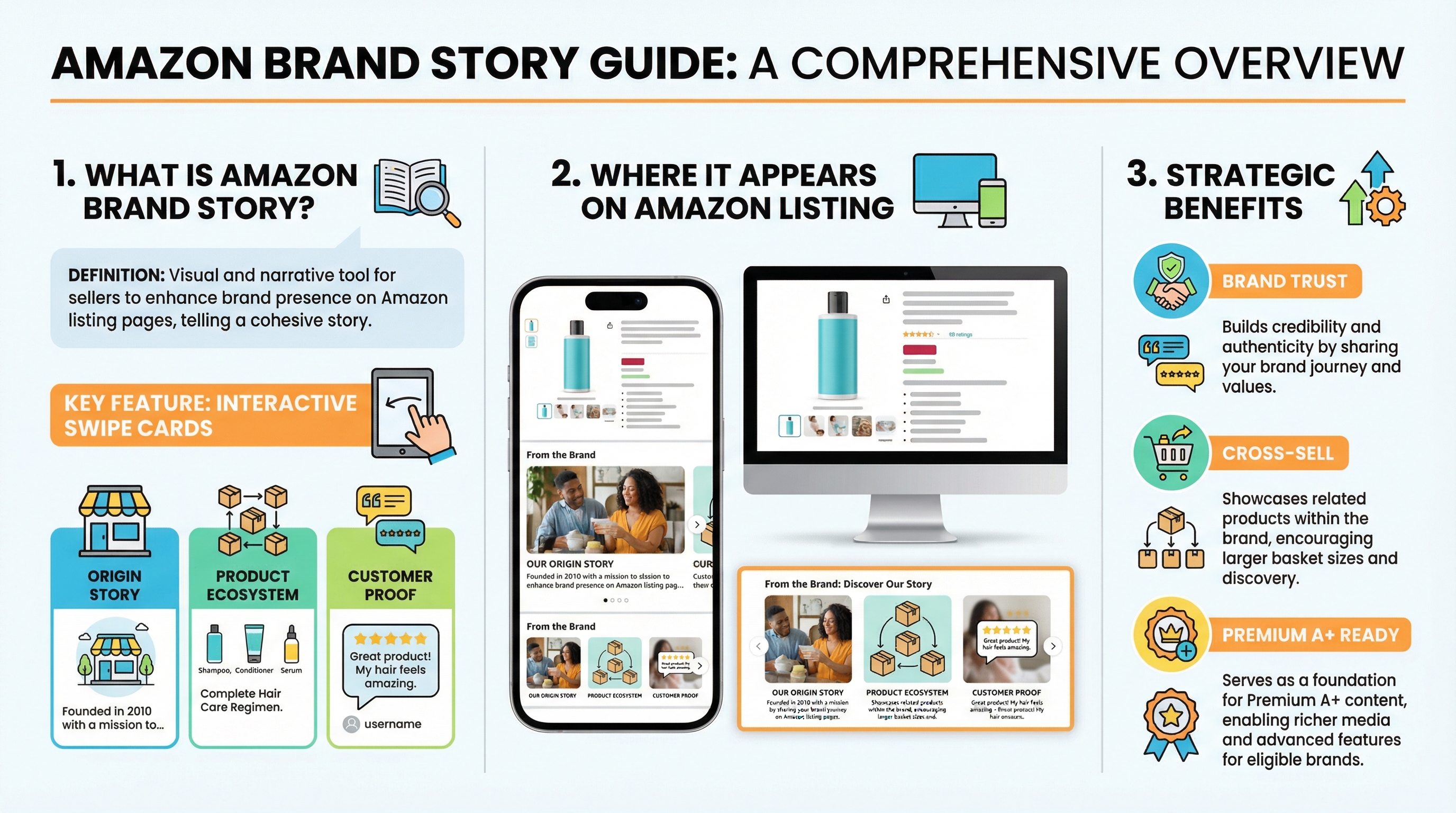
Amazon Brand Story is the swipeable "From the brand" section on your Amazon product detail page. It is a free Brand Registry asset that helps shoppers understand your brand faster, trust you sooner, and explore more of your catalog.
Use Brand Story to strengthen brand recognition and cross-sell before shoppers reach competitor recommendations. This guide is built for brand-registered sellers on Amazon.com, with notes for cross-border sellers since the workflow is largely similar across major marketplaces.
SellerSprite supports more than 1.6 million sellers with product research, keyword intelligence, and listing optimization tools. In this guide, we combine platform best practices with field-tested layouts so you can build a Brand Story that looks clean, reads fast, and supports measurable growth.
Conclusion
A strong Amazon Brand Story is not decoration. It is a structured brand and cross-sell layer that works best when it is mobile-first, visually consistent, and connected to the right ASINs.
Applicable scenarios
- You are brand-registered and want to add a high-impact trust layer on top of A+ content.
- You sell multiple related products and want to increase average order value with cross-sell cards.
- You want a cleaner brand narrative for cross-border shoppers who don't yet know your brand.
- You are working toward Premium A+ and want to complete the Brand Story coverage requirements.
Not suitable or limitations
- If you are not in Brand Registry, you cannot publish Brand Story yet.
- If your images are low quality or inconsistent, Brand Story will not fix weak creative fundamentals.
- If your catalog is scattered across unrelated audiences, cross-sell cards can confuse shoppers and reduce clarity.
If you only remember one thing
A Brand Story should do two things quickly: build shopper trust and make it easy for shoppers to buy a second item from you.
Key Takeaways
- Brand Story Amazon is the swipeable "From the brand" section that supports brand trust and cross-sell above A+ content.
- Treat Brand Story and A+ as complementary: Brand Story builds brand recognition, A+ explains product details, and provides conversion proof.
- Mobile-first layout wins: design clean backgrounds, safe zones, and let cards carry the message with minimal text.
- Use SellerSprite to build a small, high-intent keyword set for image file names and image alt text, and keep it relevant to what the image shows.
- If Premium A+ is your goal, Brand Story coverage across brand-owned ASINs is a strategic requirement to plan for early.
Table of Contents
- What is Amazon Brand Story, and where does it appear
- Why Brand Story matters for trust, AOV, and Premium A+
- Brand Story location in the listing flow
- Brand Story vs. A+ vs. Premium A+ vs. Storefront
- How to create Brand Story in Seller Central step by step
- Brand Story layouts and templates
- Pro tips for SEO and conversions
- Common mistakes and how to fix them
- FAQs
- Summary and next steps
- About the author
- References
What is Amazon Brand Story, and where does it appear
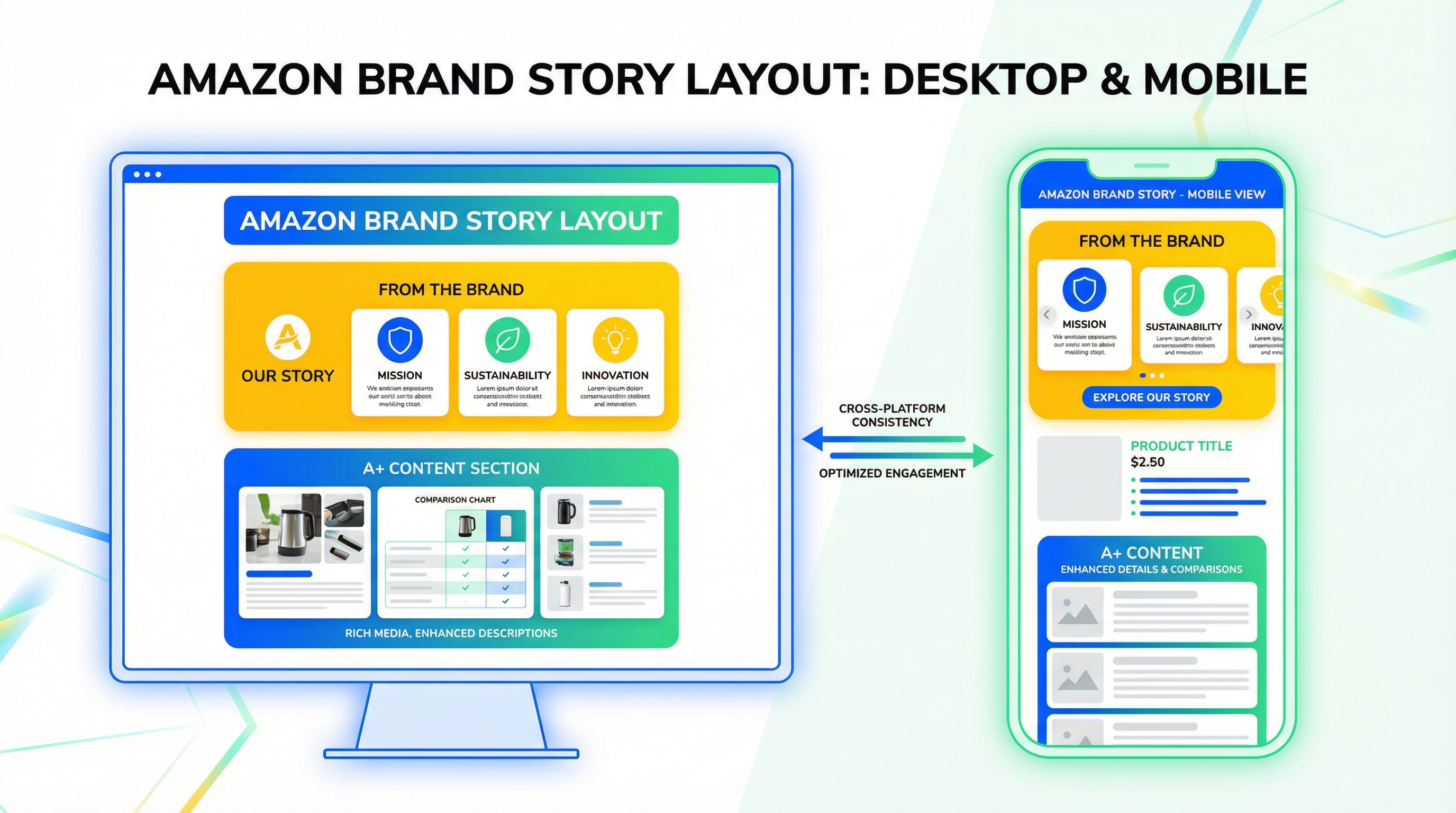
Amazon Brand Story is a carousel of swipeable cards shown in the "From the brand" section on a product detail page. The background stays consistent while shoppers swipe through cards that can highlight your mission, founder story, product ecosystem, store link, and key questions.
On the Amazon.com desktop, Brand Story typically appears above A+ content. On mobile, it often appears closer to the top of the page than you expect, so your first card has to earn attention fast.
Eligibility quick check
- You need Brand Registry access for the brand.
- Brand Story is created inside the A+ Content Manager in Seller Central.
- The workflow is similar across marketplaces. This guide uses Amazon.com labels, but cross-border sellers can follow the same steps with minor UI differences.
Why Brand Story matters for trust, AOV, and Premium A+
Brand Story is where you build brand recognition and guide shoppers to stay within your brand ecosystem. When shoppers engage longer with your brand, they are less likely to drift into competitor suggestions further down the page.
Platform context: Amazon publicly states that A+ content can increase sales, and Premium A+ can drive even larger lifts. Brand Story complements A+ by strengthening brand trust and helping with cross-selling. Use the two together for the cleanest conversion narrative.
Micro case study 1 (anonymized category: home fitness accessories)
- Before: One logo card, no store link, dense text, desktop-first layout.
- After: Founder card, product ecosystem card linking two complementary ASINs, one customer proof card, one Q&A objection card.
- Observed outcome: Conversion rate increased in the mid single digits, store visits rose, and the brand completed internal readiness steps for Premium A+ across core ASINs.
Note: results vary by category, traffic source, and creative quality.
Micro case study 2 (anonymized category: skincare tools, cross-border seller)
- Before: Background too busy on mobile, cards repeated claims without proof, no clear brand promise.
- After: Mobile safe zone background, one promise card, one proof card (warranty and testing), one product matrix card, and one store link card.
- Observed outcome: More shoppers reached the A+ and reviews sections, and accessory attach rate improved after cross-sell cards were added.
Note: cross-border brands often see a stronger impact when Brand Story reduces trust friction for new audiences.
Brand Story location in the listing flow
Use this simplified map to understand who does what in the listing. Brand Story is your brand recognition and cross-sell layer. A+ is your product detail and conversion explanation layer.
Title
Main images and video
Bullet points
Brand Story (From the brand)
A+ content
Reviews and Q&A
Brand Story vs. A+ vs. Premium A+ vs. Storefront
These four assets work best as a system. Use this quick comparison to decide what to build first and how to combine them.
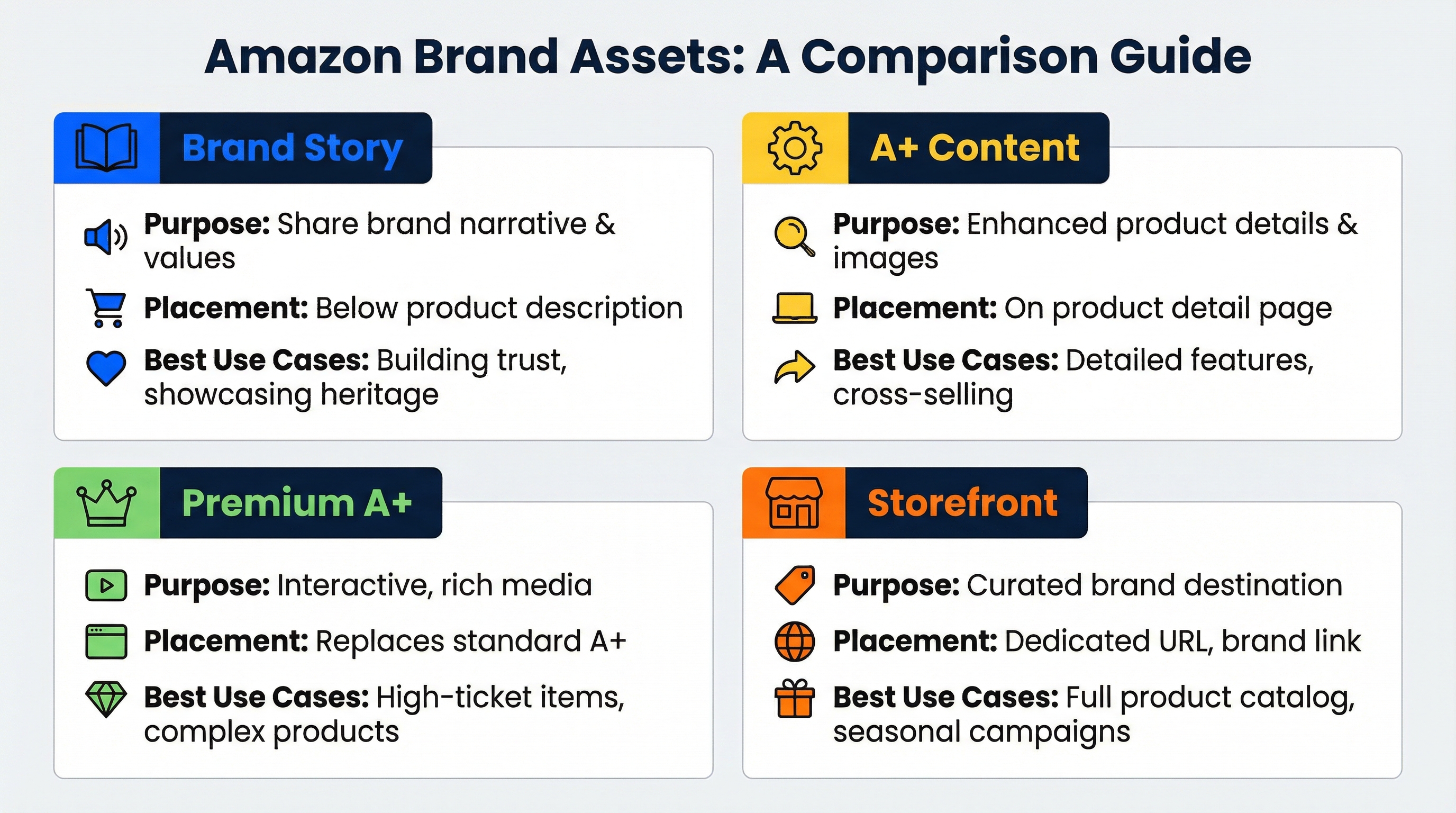
- Brand Story: fast brand trust, founder story, cross-sell, and store link in the "From the brand" section.
- A+ content: deeper product education, comparisons, and conversion proof inside the A+ module area.
- Premium A+: expanded interactive modules and richer storytelling, best after you already have strong creative fundamentals.
- Storefront: your brand mini site on Amazon, best for category navigation, collections, and external traffic landing pages.
How they work together: Use Brand Story to keep attention and cross-sell, A+ to answer product objections, and Storefront to guide shoppers into a curated catalog. If Premium A+ is the target, treat Brand Story coverage and A+ approvals as a roadmap milestone.
How to create a Brand Story in Seller Central step by step
This is the cleanest step-by-step workflow for creating an Amazon Brand Story in Seller Central. Keep your plan tight, build assets mobile-first, then apply the Brand Story to the correct ASINs.
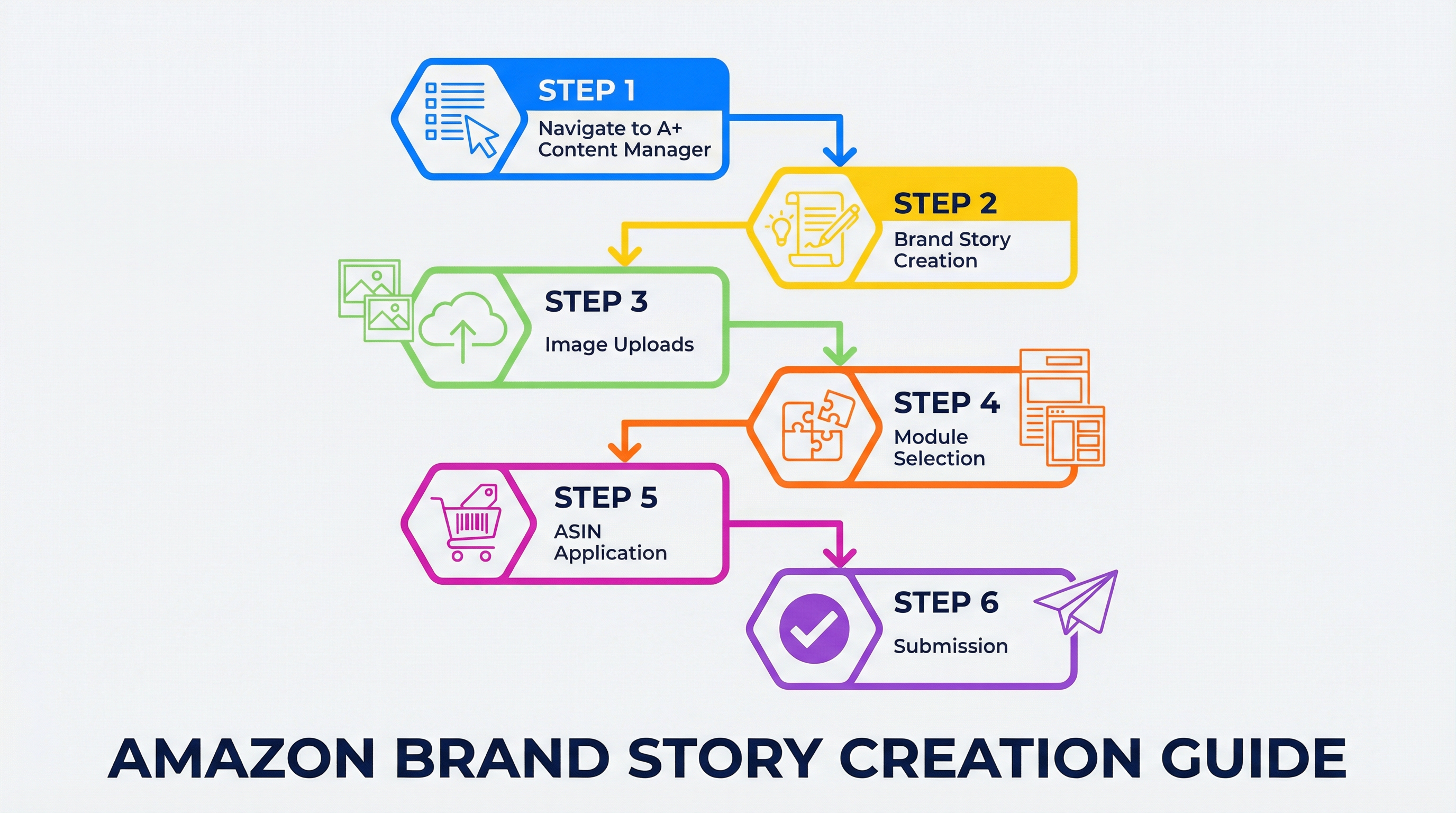
Step 1: Set a goal and choose the ASIN scope
- Pick one primary goal: brand trust, conversion support, or cross-sell to increase average order value.
- Decide the scope: one hero ASIN, one product family, or your full catalog.
- Draft your card topics: plan 4 to 6 cards before you open Seller Central.
Step 2: Build your keyword set with SellerSprite
Brand Story is not a keyword stuffing tool. Use a small set of relevant, high-intent phrases for image file names and alt text. SellerSprite makes this fast and consistent.
- Product Research: pick key competitors and study their "From the brand" positioning.
- Reverse Multiple ASINs: identify intent clusters your competitors already win.
- Keyword Mining: add only long-tail phrases that match your product and the image.
- Aim for 10 to 20 phrases total.
- Write alt text like a description, not a list.
Step 3: Design mobile-first assets with safe zones
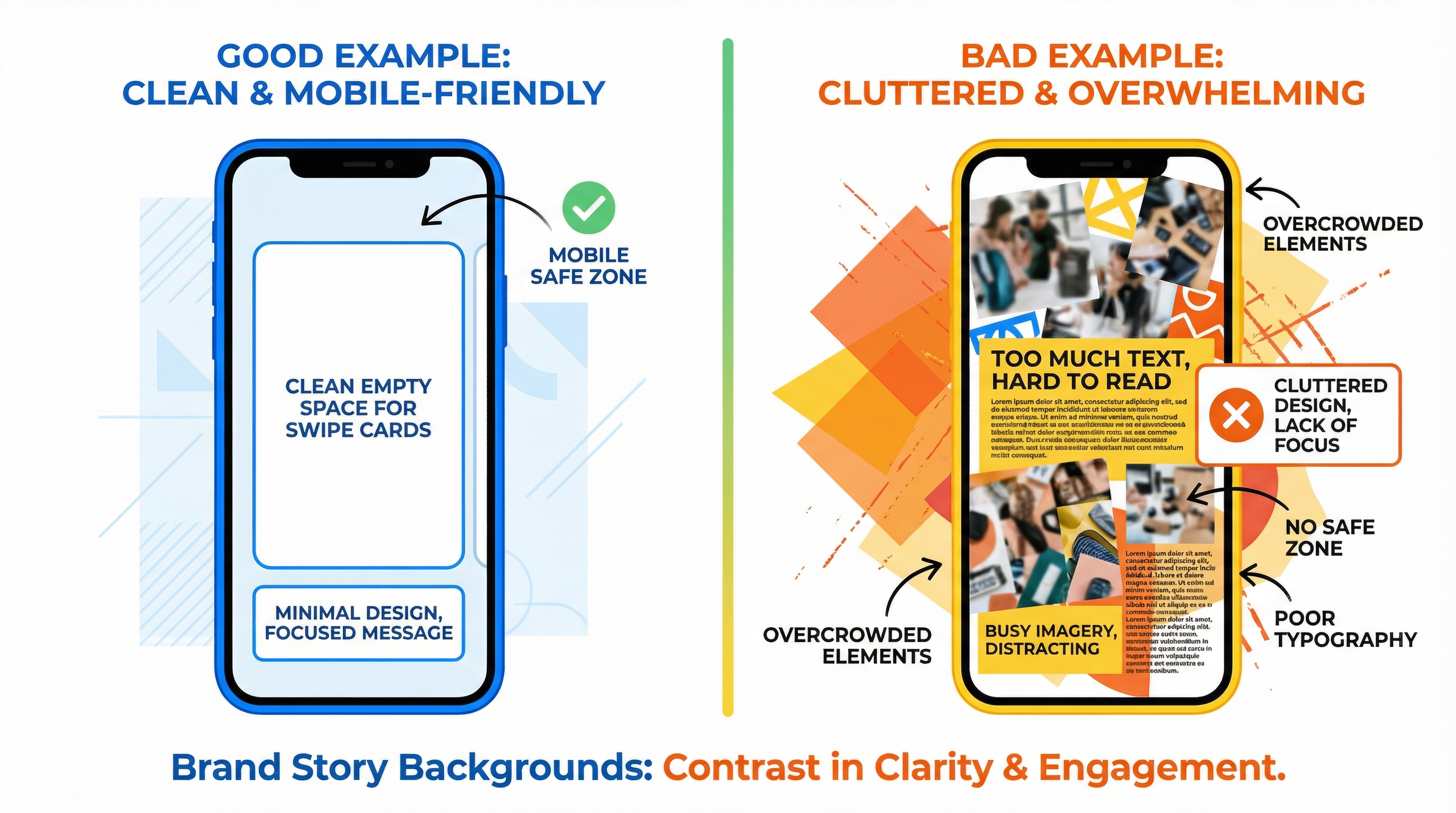
A clean background wins. Keep the card area readable, reserve space for cards, and avoid busy textures that slow down scanning on mobile.
Step 4: Create Brand Story in A+ Content Manager
- Open A+ Content Manager: Seller Central menu, Advertising, then A+ Content Manager.
- Create Brand Story: name it clearly so you can find it later.
- Upload background images: add desktop and mobile versions, then write relevant alt text.
- Add modules: choose image cards, store showcase, and optional Q&A.
Step 5: Apply ASINs and submit for review
- Apply ASINs: connect the Brand Story to the correct product detail pages.
- Preview: confirm mobile readability, card order, and image clarity.
- Submit: approval is often fast, then verify placement on live listings.
Recommended Brand Story layouts and templates
Use a template that matches your brand stage. New brands should win trust. Mature brands should win cross-sell and store navigation. Below are proven Brand Story layouts with wireframes and copy structure you can reuse.
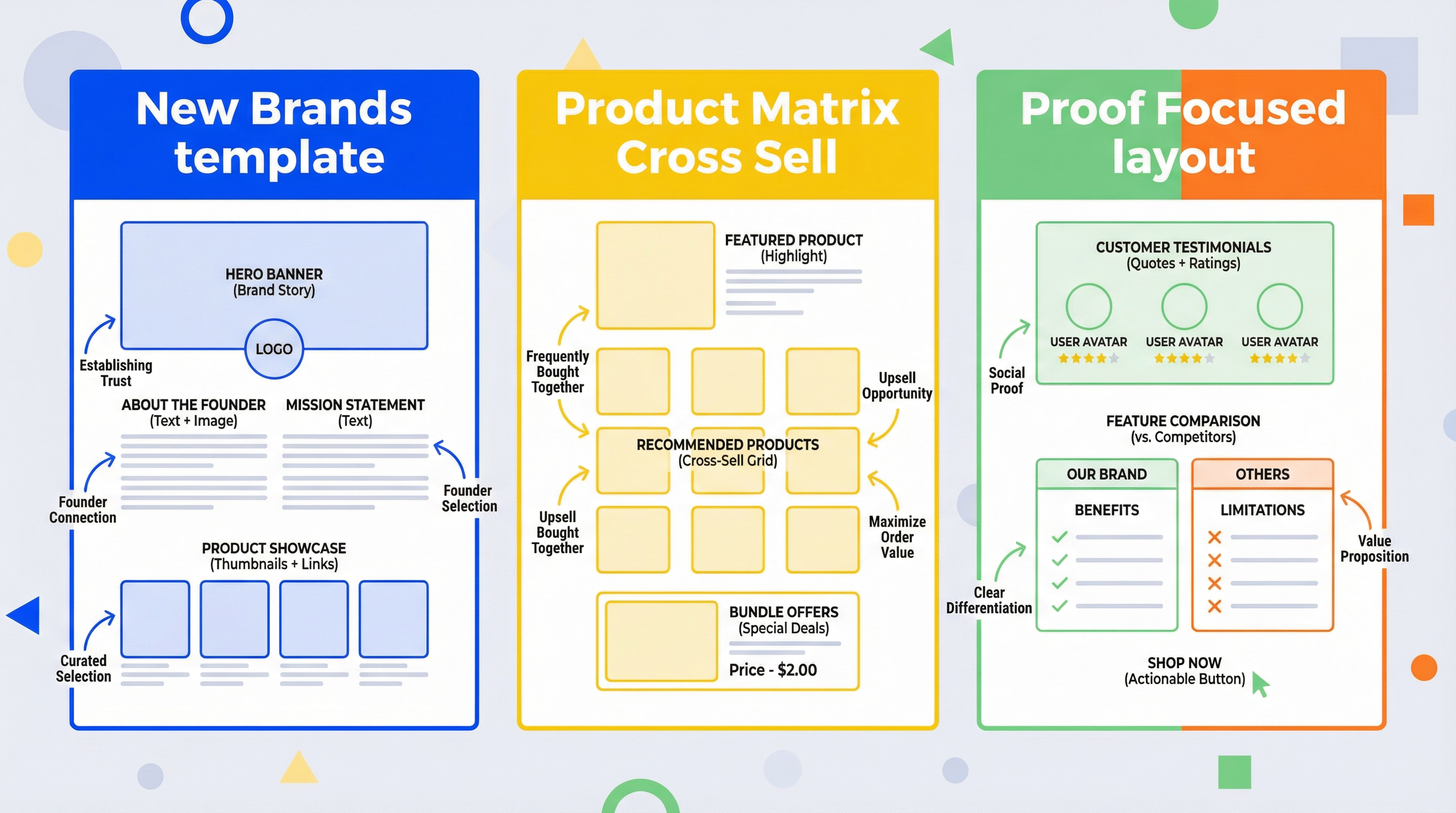
Template A: New brand narrative layout
- Background: calm brand hero visual with empty space where cards sit.
- Card 1: one sentence brand promise.
- Card 2: founder story tied to a pain point.
- Card 3: trust signals such as warranty, testing, materials, or certifications.
- Card 4: customer proof highlight with one short quote.
- Card 5: store link so shoppers can browse the full catalog.
Template B: Product matrix cross-sell layout
- Card 1: category identity, who it is for.
- Card 2: store showcase linking to the most common complementary product.
- Card 3: store showcase linking to a premium upgrade or bundle.
- Card 4: quick guide, how to choose the right version.
- Card 5: founder or brand proof to keep trust high.
Template C: Proof and objections layout
- Card 1: outcome headline, what changes for the shopper.
- Card 2: proof, testing, warranty, or measurable claim.
- Card 3: Q&A addressing the top buying objection.
- Card 4: comparison graphic, why this product is different.
- Card 5: store link or a related product that solves the next problem.
Pro tips to optimize Brand Story for SEO and conversions
Tip 1: Use SellerSprite to pick the right keywords for image alt text
Build a short list of high-intent phrases using SellerSprite Reverse Multiple ASINs and Keyword Mining. Then write alt text as a natural image description that includes one relevant phrase. This keeps the content helpful and avoids spam signals.
Tip 2: Make your first card do the heavy lifting
Many shoppers never swipe. Put your strongest promise or proof in card one, then use cards two to three for cross-sell and objections.
Tip 3: Keep visuals consistent with A+ and Storefront
Use the same typography, color system, and photo style across Brand Story, A+ content, and your Storefront. A consistent design system increases perceived brand quality.
Common mistakes and how to fix them
- Mistake: the background image is too busy, making the cards hard to read. Fix: create a clean, safe zone for the card area on mobile.
- Mistake: too much text in cards. Fix: one short headline per card, use visuals for proof.
- Mistake: no store link or product matrix. Fix: add store showcase cards for the next best item.
- Mistake: random keywords in alt text. Fix: use a focused SellerSprite keyword set and match the phrase to the image content.
- Mistake: wrong ASIN mapping. Fix: apply Brand Story to the correct product family and confirm placement after approval.
FAQs
Q1: Is Amazon Brand Story free?
A: Yes. Brand Story is a free feature for brand-registered sellers. Your main cost is design time and creative production.
Q2: Where exactly does Brand Story appear on desktop and mobile?
A: On Amazon.com desktop, it is often above A+. On mobile, it can appear closer to the top of the page, so optimize for mobile first and make the first card count.
Q3: Does Brand Story improve ranking directly?
A: Amazon does not position Brand Story as a direct ranking lever. In practice, Brand Story can support conversion and engagement, thereby indirectly improving performance over time. Keep alt text relevant and avoid keyword stuffing.
Q4: Can I reuse one Brand Story across multiple ASINs?
A: Yes. You can apply one Brand Story to multiple ASINs. Just make sure the card content aligns with the shopper mindset and the products for that ASIN set.
Q5: How does Brand Story relate to Premium A+ requirements?
A: Premium A+ qualification programs have included Brand Story coverage as a requirement in public guidance shared by Amazon forums. Treat Brand Story coverage and approved A+ submissions as a coordinated roadmap if your goal is Premium A+.
Summary and next steps
Brand Story is one of the highest-leverage free upgrades for brand-registered sellers. Build it once, measure it, and refine it as you learn what your customers care about most.
If you want to move faster, use SellerSprite to plan your keyword set, validate competitor positioning, and keep your brand assets consistent across listings.
Next step action checklist
- Use SellerSprite Reverse Multiple ASINs and Keyword Mining to build a small Brand Story keyword set.
- Pick a template and draft 4 to 6 cards that match your ASIN and goal.
- Publish the Brand Story and confirm placement on Amazon.com mobile.
- Ask the SellerSprite community for feedback before your next revision.
Share Your Sourcing Journey With SellerSprite Community
Join the SellerSprite community on the Facebook Group to share your sourcing journey, ask questions, and get support from fellow Amazon sellers.
Join SellerSprite Facebook Group
Prefer Discord? Join SellerSprite Discord
View The SellerSprite Course Directory
Ready for the next step? Open the SellerSprite Academy course directory to continue building your Amazon FBA skills chapter by chapter.
About the author
The SellerSprite Academy Team creates practical playbooks for Amazon sellers. We combine platform documentation, anonymized community patterns, and repeatable SellerSprite workflows to help you ship better listings faster.